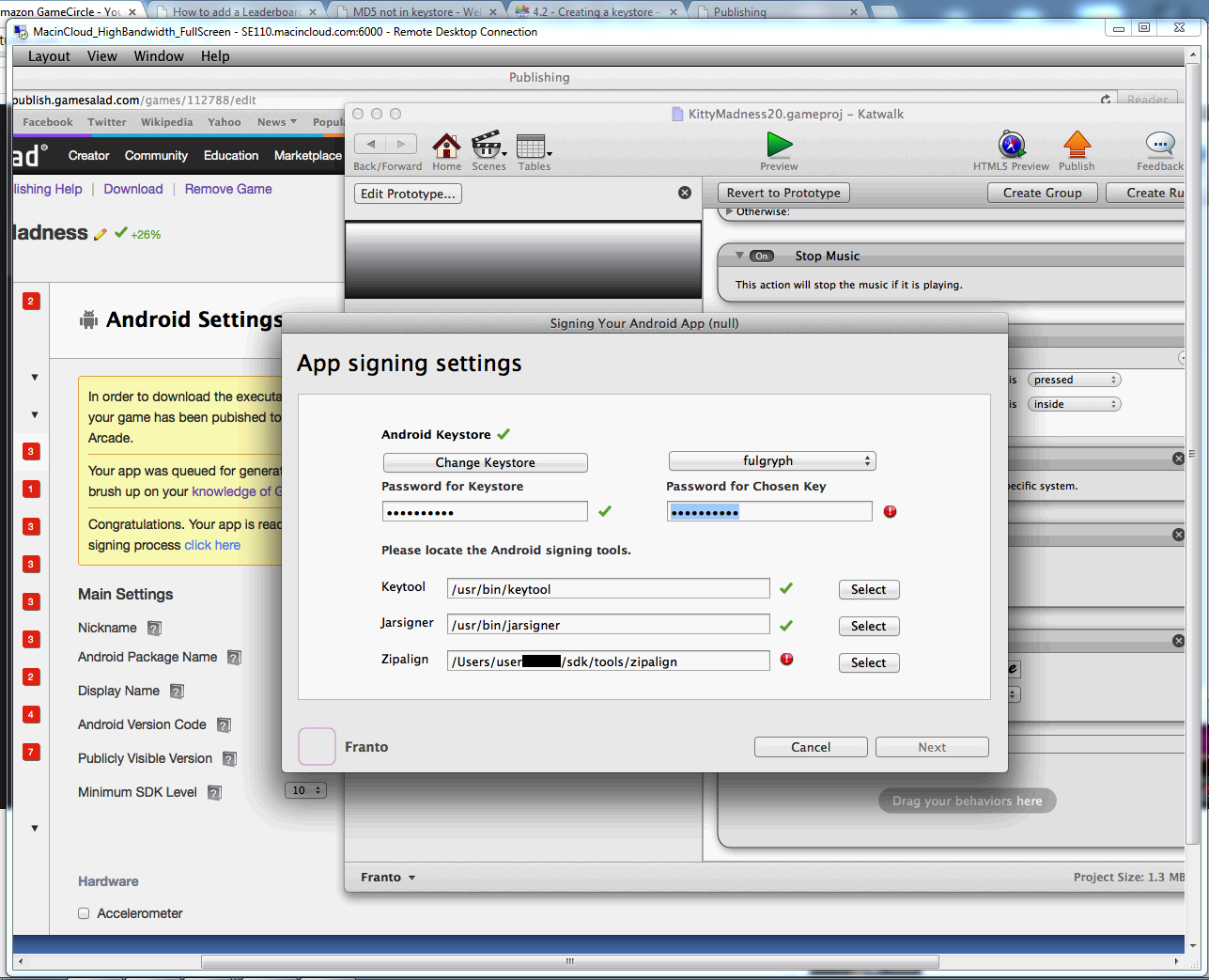
Zipalign failure when signing app(w/ screenshot)

FrantoFranto Member Posts: 779
edited October 2014 in Working with GS (Mac)


Hi guys, Im using macincloud, which comes with Android Studio and SDK apparently.

When signing the app, the zipalign has a red exclamation mark. (The key password is also getting that too, but its because I messed up the passwords when creating the keystore, so now when I type the password, it doesn't go through. I tried recreating the key multiple times, changing the password, but its probably messed up now.)

Anyways, how do I fix the zipalign part? And the password error?

Comments

  • LovejoyLovejoy Member Posts: 2,078

    @Franto said:

    Hi guys, Im using macincloud, which comes with Android Studio and SDK apparently.

    When signing the app, the zipalign has a red exclamation mark. (The key password is also getting that too, but its because I messed up the passwords when creating the keystore, so now when I type the password, it doesn't go through. I tried recreating the key multiple times, changing the password, but its probably messed up now.)

    Anyways, how do I fix the zipalign part? And the password error?

    Zipalign has a new location, it is now under sdk -> build tools -> 20.0.0

  • FrantoFranto Member Posts: 779

    Thanks, I looked and it turned out the sdk folder was gone. The only Android support was an Android beta program that wasn't the SDK but meant to replace it, but was a bit outdated. I had to download and implement the real android SDK, fixed the password issue, and it worked.

    Once I downloaded the SDK, I followed the path you put and found the zip align. Thanks again.

  • LovejoyLovejoy Member Posts: 2,078

    @Franto said:
    Thanks, I looked and it turned out the sdk folder was gone. The only Android support was an Android beta program that wasn't the SDK but meant to replace it, but was a bit outdated. I had to download and implement the real android SDK, fixed the password issue, and it worked.

    Once I downloaded the SDK, I followed the path you put and found the zip align. Thanks again.

    No problem, glad i could help.

Sign In or Register to comment.